




Y
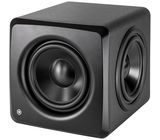
IK iLoud Sub review
Installing the Sub.
The physical installation was simple enough. As per the website instructions, download and install the software first. If you want to use the room correction feature (and why wouldn’t you) then you’ll need to download both the ARC X software and the iLoud ASIO driver.
Remember to set the top monitor speakers to high pass at 80Hz, so preventing them from handling the low frequencies which the Sub will deal with once everything has been set up.
The audio connections are as follows. (I used the balanced, XLR ins and outs.)
Connect two cables for the Left and Right channels from your audio interface’s monitor output to the L and R inputs of the Sub. Connect two cables for the Left and Right channels from the Sub L and R outputs to the top monitor speakers. Connect a USB cable and the power cable to the Sub, and you’re done.
Issues I had.
(Skip to The USB connection section.)
Some information about the USB connection that wasn’t immediately obvious to me.
The USB connection requires the iLoud ASIO driver (available from the IK iLoud website) to be installed. Initially, I couldn’t get my ARC X program to progress beyond the Layout page. As advised in the instructions, I had set up ARC X to be Stereo + Sub. However, despite being able to choose my audio interface as a Device, I was unable to select the iLoud Sub on the drop down Devices menu for the Sub, since it simply didn’t appear as an option. (These settings being on the panel on the right side of ARC X page.) This was preventing me from completing this task and being allowed to move on to the next step. At this point, I noticed that the Calibrate, Edit and Remote options on the left side of the ARC X page were greyed out.
An email to IK UK received a fast response (within a few minutes) and advised me to check my Widows 11 device drivers (via Windows Control Panel) to determine that the iLoud Sub ASIO driver had been loaded, and also to check and replace my USB cable if necessary.
Turns out that the iLoud Sub ASIO drivers were not showing in the Windows Drivers panel (under Sounds and Game Devices). So, I reinstalled the iLoud Sub ASIO driver, then rebooted Windows. The iLoud Sub ASIO driver was now showing in the Windows device drivers list.
I also took the opportunity to reconnect the USB cable directly into a USB port, as opposed to using the passive USB Hub which I had initially connected to.
Now I was able to see and select the iLoud Sub as an option in the ARC X Driver drop down menu. After choosing the iLoud Sub option, I was able to move on to the Calibration option which, along with the Edit and Remote options, was no longer greyed out and, so, available to me. All sorted, with grateful thanks to IK support.
The USB Connection.
It is important to realise that:
1. The ARC X program will not see the Sub without the USB connection.
2. When the USB is connected all audio from the PC will be sent over this USB link.
Once ARC X has been used to calibrate the Sub and top monitors, and any other adjustments are made, then the resulting calibration should be saved to (i.e. stored in) the Sub. Once this has been done, then the USB connection can be removed and your PC’s audio output directed back to your audio interface. This now allows the audio interface to control the audio volume of the whole system - which it cannot do when the USB connection is engaged.
Calibration, Edit, Save and Remote settings.
Following advice I saw somewhere, I temporarily marked out the 7 calibration positions on the floor using masking tape. I ran the 21 point calibration sequence without any problems being careful to follow the instructions.
When completed, I checked the Edit page and left it at the Default settings. (Default gives a slight low end boost along with a slight high end cut.)
I didn’t do anything with the Remote page at this point.
I then saved my calibrated and edited settings with a unique name.
This saves the configuration to the PC for recall by the ARC X program at a later date.
However, it’s important to realise that the configuration also needs to be uploaded to the iLoud Sub, too. This saves a copy of the calibration directly to the Sub such that, when you subsequently disconnect the USB cable, then your chosen calibration is active within the system.
Assuming that you will want to control your audio output of your PC from your audio interface (I know that I certainly do but your needs may be different), then you will want to disconnect the USB cable.
Observations.
Most obvious was the difference in the sound of the audio. While the ARC X was still connected, I switched between it being Off and On using the Bypass switch in ARC X. What a vast improvement, in my case. I knew from previous experiences that I had difficulty in my room with low end. I had previously set up some DIY sound absorption but this seemed to make little to no difference. However, now with the room calibration switched on, WHAT a difference. The low mids and low end seem much more even and defined. Before, it was just a mish-mash of indistinct parts.
The difference truly is amazing. It’s like an entirely different room. I am totally delighted with the vast improvement in my room sound. For me, the iLoud Sub has been an extremely worthwhile investment which has hugely transformed my monitoring system.
Based on my experience, I can heartily recommend IK’s iLoud Sub. Superb.
The physical installation was simple enough. As per the website instructions, download and install the software first. If you want to use the room correction feature (and why wouldn’t you) then you’ll need to download both the ARC X software and the iLoud ASIO driver.
Remember to set the top monitor speakers to high pass at 80Hz, so preventing them from handling the low frequencies which the Sub will deal with once everything has been set up.
The audio connections are as follows. (I used the balanced, XLR ins and outs.)
Connect two cables for the Left and Right channels from your audio interface’s monitor output to the L and R inputs of the Sub. Connect two cables for the Left and Right channels from the Sub L and R outputs to the top monitor speakers. Connect a USB cable and the power cable to the Sub, and you’re done.
Issues I had.
(Skip to The USB connection section.)
Some information about the USB connection that wasn’t immediately obvious to me.
The USB connection requires the iLoud ASIO driver (available from the IK iLoud website) to be installed. Initially, I couldn’t get my ARC X program to progress beyond the Layout page. As advised in the instructions, I had set up ARC X to be Stereo + Sub. However, despite being able to choose my audio interface as a Device, I was unable to select the iLoud Sub on the drop down Devices menu for the Sub, since it simply didn’t appear as an option. (These settings being on the panel on the right side of ARC X page.) This was preventing me from completing this task and being allowed to move on to the next step. At this point, I noticed that the Calibrate, Edit and Remote options on the left side of the ARC X page were greyed out.
An email to IK UK received a fast response (within a few minutes) and advised me to check my Widows 11 device drivers (via Windows Control Panel) to determine that the iLoud Sub ASIO driver had been loaded, and also to check and replace my USB cable if necessary.
Turns out that the iLoud Sub ASIO drivers were not showing in the Windows Drivers panel (under Sounds and Game Devices). So, I reinstalled the iLoud Sub ASIO driver, then rebooted Windows. The iLoud Sub ASIO driver was now showing in the Windows device drivers list.
I also took the opportunity to reconnect the USB cable directly into a USB port, as opposed to using the passive USB Hub which I had initially connected to.
Now I was able to see and select the iLoud Sub as an option in the ARC X Driver drop down menu. After choosing the iLoud Sub option, I was able to move on to the Calibration option which, along with the Edit and Remote options, was no longer greyed out and, so, available to me. All sorted, with grateful thanks to IK support.
The USB Connection.
It is important to realise that:
1. The ARC X program will not see the Sub without the USB connection.
2. When the USB is connected all audio from the PC will be sent over this USB link.
Once ARC X has been used to calibrate the Sub and top monitors, and any other adjustments are made, then the resulting calibration should be saved to (i.e. stored in) the Sub. Once this has been done, then the USB connection can be removed and your PC’s audio output directed back to your audio interface. This now allows the audio interface to control the audio volume of the whole system - which it cannot do when the USB connection is engaged.
Calibration, Edit, Save and Remote settings.
Following advice I saw somewhere, I temporarily marked out the 7 calibration positions on the floor using masking tape. I ran the 21 point calibration sequence without any problems being careful to follow the instructions.
When completed, I checked the Edit page and left it at the Default settings. (Default gives a slight low end boost along with a slight high end cut.)
I didn’t do anything with the Remote page at this point.
I then saved my calibrated and edited settings with a unique name.
This saves the configuration to the PC for recall by the ARC X program at a later date.
However, it’s important to realise that the configuration also needs to be uploaded to the iLoud Sub, too. This saves a copy of the calibration directly to the Sub such that, when you subsequently disconnect the USB cable, then your chosen calibration is active within the system.
Assuming that you will want to control your audio output of your PC from your audio interface (I know that I certainly do but your needs may be different), then you will want to disconnect the USB cable.
Observations.
Most obvious was the difference in the sound of the audio. While the ARC X was still connected, I switched between it being Off and On using the Bypass switch in ARC X. What a vast improvement, in my case. I knew from previous experiences that I had difficulty in my room with low end. I had previously set up some DIY sound absorption but this seemed to make little to no difference. However, now with the room calibration switched on, WHAT a difference. The low mids and low end seem much more even and defined. Before, it was just a mish-mash of indistinct parts.
The difference truly is amazing. It’s like an entirely different room. I am totally delighted with the vast improvement in my room sound. For me, the iLoud Sub has been an extremely worthwhile investment which has hugely transformed my monitoring system.
Based on my experience, I can heartily recommend IK’s iLoud Sub. Superb.
20
3
Anmeld bedømmelse
b
At the price, for a small to medium space it's a no-brainer.
Really impressed with the build and sound quality of this. I have this sub hooked up with 2 Neumann KH80's. The built-in Arc-X room correction works amazingly well. At home I mix at lower volumes (around 75dB) in a room with some, but not enough acoustic, treatment. Running Arc-X showed a big null in the listening position around 100Hz. The corrected profile, assisted by the sub, made a huge difference in what I was hearing, allowing me to make more considered mixing decisions without going into the studio. I find my time is spent much more productively. At the price it's a no-brainer.
1
0
Anmeld bedømmelse
F
Buy Now
Not only a terrific sub for it's size and driver dimensions, but the in built ARC correction has been a godsend for my small home studio. Must buy.
0
0
Anmeld bedømmelse